OpenWrt on a Raspberry PI 4B: Dynamic DNS with AWS Route 53 #
Set up and tested in October 2026 on OpenWrt 25.12.5 with kernel 6.12.94 and ddns-scripts 2.8.4-8. This part of the series builds on the Essentials, the parts about Docker and WireGuard are coming soon.
In OpenWrt on a Raspberry PI 4B: Essentials I described how the PI gets its addresses from the provider: a public IPv4 address by DHCP, plus a single IPv6 address and a /48 prefix by DHCPv6. Neither of them is guaranteed to stay the same. As soon as I want to reach the router from outside, for example for the WireGuard server of a later part, I need a name that always points to the current addresses.
I already use AWS Route 53 for DNS, so it makes sense to put the record there instead of signing up with another dynamic DNS provider. This article first describes what has to be set up in AWS and then how the router keeps an A and an AAAA record up to date. The domain does not have to be registered with AWS. If it was bought from another registrar such as Namecheap, Route 53 can still serve its DNS, and the AWS part shows how.
(Note: Creating and setting up an AWS or Namecheap account, or buying the domain, is out of scope for this article. For that, see How to Create an AWS Account by AWS and How to register a domain name by Namecheap, which also covers creating the account)
(Note: The domain example.com, the hosted zone ID, the access keys and all addresses in this article are made up)
How it fits together #
OpenWrt has a package for exactly this job, ddns-scripts-route53. It watches the WAN interfaces, and whenever an
address changes, it sends the new address to the Route 53 API. To do so, the router needs three things from AWS:
- The ID of the hosted zone that contains the record.
- An access key, so that the request can be signed.
- Permission for that key to change the record, and nothing else.
The AWS part is done once from the PC. Everything after that happens on the router.
AWS #
I set up the AWS side with the AWS CLI in PowerShell on my PC instead of clicking through the console. The commands are easy to copy, and they do not go out of date every time the console gets a new design.
(Note: The backtick at the end of a line is PowerShell’s line continuation, like \ in the router’s shell. It must be
the last character on the line. In bash, use \ instead)
1. Logging in the AWS CLI #
The CLI is installed with winget. aws login, which is used below, needs at least version 2.32.0:
PS C:\> winget install --id Amazon.AWSCLI
PS C:\> aws --version
Since version 2.32.0, the CLI can log in with the same credentials as the AWS console. aws login opens the
browser, I sign in there as usual (including MFA), and the CLI receives temporary credentials. No access key for my
own user is stored on the PC, which is the main reason I prefer it over aws configure:
PS C:\> aws login
On the first run, the CLI asks for a default region. Route 53 and IAM are global services, so any region will do.
The session is refreshed automatically for up to 12 hours, after that aws login has to be run again.
Please note, the user I sign in with must be allowed to manage IAM and Route 53, and it needs the AWS managed policy
SignInLocalDevelopmentAccess for aws login itself. The root user works without it, but it should not be used for
everyday work anyway.
2. The hosted zone #
A
hosted zone holds the
DNS records of a domain. If the domain was registered with Route 53, the zone was created automatically and this
step is only about finding its ID. If the domain was bought from another registrar, the zone has to be created
first. The --caller-reference is just a unique string that prevents the zone from being created twice if the
request is repeated, so the current time is good enough:
PS C:\> aws route53 create-hosted-zone --name example.com `
  --caller-reference (Get-Date -Format o) --query 'HostedZone.Id' --output text
/hostedzone/Z0123456789EXAMPLE
A hosted zone costs USD 0.50 per month plus a small amount per million queries. For an existing zone, the ID can be looked up by name:
PS C:\> aws route53 list-hosted-zones-by-name --dns-name example.com `
  --max-items 1 --query 'HostedZones[0].Id' --output text
/hostedzone/Z0123456789EXAMPLE
Either way, the script needs the ID of the hosted zone, not the domain name, and only the part after
/hostedzone/ goes into the configuration. Next, I need the four name servers AWS assigned to the zone. They are
needed at the registrar in the next step, and I use one of them for testing later:
PS C:\> aws route53 get-hosted-zone --id Z0123456789EXAMPLE `
  --query 'DelegationSet.NameServers' --output text
ns-123.awsdns-45.com    ns-678.awsdns-90.net    ns-1234.awsdns-56.org    ns-1789.awsdns-01.co.uk
3. Pointing the domain to Route 53 #
This step is only needed if the domain is registered somewhere else. As long as the registrar’s own name servers answer for the domain, nobody will ever ask Route 53, and the record the router writes would have no effect. So the registrar has to hand the domain over to the four AWS name servers.
Warning!
Records are not copied over. If the domain already has records at the registrar, for example MX records for email or a website, recreate them in the new hosted zone before switching the name servers. Otherwise they stop working as soon as the change takes effect. The registrar’s email and URL forwarding stop working as well.
At Namecheap the steps are:
- Log in and select Domain List in the left sidebar, then Manage next to the domain.
- If DNSSEC is switched on under Advanced DNS, switch it off first. The signatures would not match the records of the new zone, and validating resolvers would reject the domain.
- In the Nameservers section, choose Custom DNS from the drop-down menu.
- Enter the four name servers from the previous step, one per field and without a trailing dot, for example
ns-123.awsdns-45.com. Use Add Nameserver for the third and fourth. - Save with the green checkmark.
Other registrars have the same setting, usually called “custom name servers” or “external DNS”. According to
Namecheap, the change can take up to 24 hours, sometimes longer, until all resolvers see it. I check it against a
public resolver; once the change is through, the answer lists the four awsdns servers:
PS C:\> Resolve-DnsName example.com -Type NS -Server 1.1.1.1

Name                           Type   TTL   Section    NameHost
----                           ----   ---   -------    --------
example.com                    NS     17280 Answer     ns-678.awsdns-90.net
                                      0
example.com                    NS     17280 Answer     ns-1234.awsdns-56.org
                                      0
example.com                    NS     17280 Answer     ns-1789.awsdns-01.co.uk
                                      0
example.com                    NS     17280 Answer     ns-123.awsdns-45.com
                                      0
While the old entry is still cached, the answer lists the registrar’s name servers instead, for Namecheap
dns1.registrar-servers.com and dns2.registrar-servers.com. To skip all caches, I asked a name server of the
top-level domain directly with nslookup -type=ns -norecurse <domain> <tld server>.
Please note, the A record the domain had at Namecheap is gone after the switch, because the new zone only contains the NS and SOA records. The router creates its own record further below.
4. An IAM user for the router #
The router gets its own IAM user. It has no password and therefore no console access, only an access key:
PS C:\> aws iam create-user --user-name openwrt-ddns
{
  "User": {
    "Path": "/",
    "UserName": "openwrt-ddns",
    "UserId": "AIDAIOSFODNN7EXAMPLE",
    "Arn": "arn:aws:iam::123456789012:user/openwrt-ddns",
    "CreateDate": "2026-10-25T03:03:40+00:00"
  }
}
5. A policy that allows exactly one record #
The access key will be stored in plain text on the router, so I want it to be useless for anything else. Route 53
supports
condition keys
that limit ChangeResourceRecordSets to certain names, record types and actions. The following policy allows the
user to UPSERT the A and AAAA record of home.example.com in one hosted zone, and nothing else. I saved it as
route53-ddns.json:
{
  "Version": "2012-10-17",
  "Statement": [
    {
      "Effect": "Allow",
      "Action": "route53:ChangeResourceRecordSets",
      "Resource": "arn:aws:route53:::hostedzone/Z0123456789EXAMPLE",
      "Condition": {
        "ForAllValues:StringEquals": {
          "route53:ChangeResourceRecordSetsNormalizedRecordNames": [
            "home.example.com"
          ],
          "route53:ChangeResourceRecordSetsRecordTypes": ["A", "AAAA"],
          "route53:ChangeResourceRecordSetsActions": ["UPSERT"]
        }
      }
    }
  ]
}
(Note: Replace home.example.com with the name under your own domain, and Z0123456789EXAMPLE with the ID of
your hosted zone)
Then I attach it to the user as an inline policy:
PS C:\> aws iam put-user-policy --user-name openwrt-ddns `
  --policy-name route53-ddns --policy-document file://route53-ddns.json
Keep in mind that the names in the condition must be lowercase and without the trailing dot. The script does not read anything from Route 53, and it does not wait for the change to be propagated, so no other permission is needed.
6. The access key #
PS C:\> aws iam create-access-key --user-name openwrt-ddns `
  --query 'AccessKey.[AccessKeyId,SecretAccessKey]' --output text
AKIAIOSFODNN7EXAMPLE    wJalrXUtnFEMI/K7MDENG/bPxRfiCYEXAMPLEKEY
The secret access key is shown only this once, so I keep the window open until it is configured on the router.
That is all the router needs from AWS. Afterwards, aws logout deletes the cached session of my own user.
The router #
Logging in #
Everything on the router is done in an SSH session as root. How I set up key-based login is described in the Essentials article.
PS C:\> ssh root@10.0.0.1


BusyBox v1.37.0 (2026-10-16 07:35:47 UTC) built-in shell (ash)

  _______                     ________        __
 |       |.-----.-----.-----.|  |  |  |.----.|  |_
 |   -   ||  _  |  -__|     ||  |  |  ||   _||   _|
 |_______||   __|_____|__|__||________||__|  |____|
          |__| W I R E L E S S   F R E E D O M
 -----------------------------------------------------
 OpenWrt 25.12.5, r33051-f5dae5ece4 Dave's Guitar
 -----------------------------------------------------
root@OpenWrt:~#
All following commands run in this session.
What OpenWrt offers #
Dynamic DNS on OpenWrt is handled by
ddns-scripts. The
core package watches an interface, finds out its current address, compares it with what DNS returns for the name and
calls the provider when they differ. Providers come as small extension packages, and
LuCI gets a page under Services → Dynamic DNS with
luci-app-ddns.
For Route 53 there is the package ddns-scripts-route53. It contains a single shell script of about 100 lines,
update_route53_v1.sh, which signs the request with
AWS Signature Version
4 using openssl and sends it with curl.
There is no need for the AWS CLI on the router. The request is a ChangeResourceRecordSets call with the action
UPSERT, which creates the record or overwrites it.
On my router, ddns-scripts and luci-app-ddns are already part of the firmware image. What is missing is the
Route 53 extension and its two dependencies:
root@OpenWrt:~# apk list --installed | grep ddns
ddns-scripts-2.8.4-r8 noarch {feeds/packages/feeds/packages/net/ddns-scripts} (GPL-2.0) [installed]
ddns-scripts-services-2.8.4-r8 noarch {feeds/packages/feeds/packages/net/ddns-scripts} (GPL-2.0) [installed]
luci-app-ddns-26.288.56989~75a306d noarch {feeds/luci/feeds/luci/applications/luci-app-ddns} (Apache-2.0) [installed]
root@OpenWrt:~# apk list -a ddns-scripts-route53 curl openssl-util
curl-8.23.0-r1 aarch64_cortex-a72 {feeds/packages/feeds/packages/net/curl} (MIT)
ddns-scripts-route53-2.8.4-r8 noarch {feeds/packages/feeds/packages/net/ddns-scripts} (GPL-2.0)
openssl-util-3.5.9-r1 aarch64_cortex-a72 {feeds/base/libs/openssl} (Apache-2.0)
A few things I noticed when reading the script:
- The TTL is fixed at 300 seconds, and every record gets exactly one value.
- One service section updates one record type. For an A and an AAAA record, I need two sections.
- The signature contains the current time, and AWS rejects requests whose clock is more than a few minutes off. NTP is enabled on the router, but after a power outage the first update can only work once the clock is set.
- If ddns-scripts cannot find an address, the script still sends the request with an empty value, and Route 53
answers with
InvalidChangeBatch. Someone ran into this in the OpenWrt forum.
What the provider hands out #
Before deciding where ddns-scripts takes the addresses from, I checked what the WAN interfaces actually get. On a
connection behind
CGNAT the WAN address would be a private one,
and the record would have to be fed from an external service like checkip.amazonaws.com instead.
root@OpenWrt:~# ifstatus wan | jsonfilter -e '@["ipv4-address"][0].address'
192.0.2.45
root@OpenWrt:~# ifstatus wan6 | jsonfilter -e '@["ipv6-address"]' \
  -e '@["ipv6-prefix"][*].address'
[ { "address": "2001:db8:ffff:1::2a", "mask": 128, "preferred": 3424, "valid": 7025 } ]
2001:db8:1234::
My provider hands out a public IPv4 address and, on wan6, a single /128 address next to the /48 prefix. So both
records can take the address directly from the interfaces (ip_source set to network), which is also what
triggers an update right away through hotplug when an address changes.
Please note, the AAAA record points to the WAN address of the router itself, not to a device in the LAN. That is what I need for services running on the router, such as WireGuard. A device behind the router would need its own address from the delegated prefix, which is a different topic.
Installing the package #
root@OpenWrt:~# apk update
root@OpenWrt:~# apk add ddns-scripts-route53
curl and openssl-util come as dependencies. ca-bundle, which curl needs to verify the certificate of
route53.amazonaws.com, is already installed. Since I upgrade with
owut, which builds the new image with all
installed packages, the extension survives future upgrades.
Configuration #
It is worth mentioning that the Route 53 script reuses the generic fields of ddns-scripts for things they were not
named for. This is the most confusing part of the whole setup, in LuCI as well as in /etc/config/ddns:
| Field | LuCI label | What goes in for Route 53 |
|---|---|---|
lookup_host | Lookup Hostname | The name to update, e.g. home.example.com |
domain | Domain | The hosted zone ID, e.g. Z0123456789EXAMPLE, not the domain name |
username | Username | The access key ID of the IAM user |
password | Password | The secret access key of the IAM user |
use_ipv6 | IP address version | 0 for the A record, 1 for the AAAA record |
/etc/config/ddns still contains the two example sections myddns_ipv4 and myddns_ipv6, which are disabled. I
keep a copy of the original file outside of /etc/config, then replace the examples with one section per record
type. uci batch takes the settings of both sections in one go. The values are the ones from the AWS steps
above:
(Note: domain is the hosted zone ID from
step 2, only the part after /hostedzone/. The
access key ID and the secret access key go into username and password)
root@OpenWrt:~# cp /etc/config/ddns /root/ddns.example
root@OpenWrt:~# uci -q delete ddns.myddns_ipv4
root@OpenWrt:~# uci -q delete ddns.myddns_ipv6
root@OpenWrt:~# uci batch <<EOF
set ddns.route53_ipv4=service
set ddns.route53_ipv4.enabled='1'
set ddns.route53_ipv4.service_name='route53-v1'
set ddns.route53_ipv4.lookup_host='home.example.com'
set ddns.route53_ipv4.domain='Z0123456789EXAMPLE'
set ddns.route53_ipv4.username='AKIAIOSFODNN7EXAMPLE'
set ddns.route53_ipv4.password='wJalrXUtnFEMI/K7MDENG/bPxRfiCYEXAMPLEKEY'
set ddns.route53_ipv4.ip_source='network'
set ddns.route53_ipv4.dns_server='1.1.1.1'
set ddns.route53_ipv4.check_interval='5'
set ddns.route53_ipv4.check_unit='minutes'
set ddns.route53_ipv4.use_ipv6='0'
set ddns.route53_ipv4.interface='wan'
set ddns.route53_ipv4.ip_network='wan'
set ddns.route53_ipv6=service
set ddns.route53_ipv6.enabled='1'
set ddns.route53_ipv6.service_name='route53-v1'
set ddns.route53_ipv6.lookup_host='home.example.com'
set ddns.route53_ipv6.domain='Z0123456789EXAMPLE'
set ddns.route53_ipv6.username='AKIAIOSFODNN7EXAMPLE'
set ddns.route53_ipv6.password='wJalrXUtnFEMI/K7MDENG/bPxRfiCYEXAMPLEKEY'
set ddns.route53_ipv6.ip_source='network'
set ddns.route53_ipv6.dns_server='1.1.1.1'
set ddns.route53_ipv6.check_interval='5'
set ddns.route53_ipv6.check_unit='minutes'
set ddns.route53_ipv6.use_ipv6='1'
set ddns.route53_ipv6.interface='wan6'
set ddns.route53_ipv6.ip_network='wan6'
EOF
Before saving, uci changes lists everything that is about to be written, so typos show up here and not later in
the log:
root@OpenWrt:~# uci changes ddns
root@OpenWrt:~# uci commit ddns
The result in /etc/config/ddns looks like this for IPv4. The IPv6 section only differs in use_ipv6, interface
and ip_network:
root@OpenWrt:~# cat /etc/config/ddns
...
config service 'route53_ipv4'
  option enabled '1'
  option service_name 'route53-v1'
  option lookup_host 'home.example.com'
  option domain 'Z0123456789EXAMPLE'
  option username 'AKIAIOSFODNN7EXAMPLE'
  option password 'wJalrXUtnFEMI/K7MDENG/bPxRfiCYEXAMPLEKEY'
  option ip_source 'network'
  option dns_server '1.1.1.1'
  option check_interval '5'
  option check_unit 'minutes'
  option use_ipv6 '0'
  option interface 'wan'
  option ip_network 'wan'
...
dns_server is there for a reason. ddns-scripts decides whether an update is needed by looking up lookup_host in
DNS. Without it, the lookup goes to the local dnsmasq, which may still have the old address in its cache, and the
next check would compare against an outdated value. A public resolver such as 1.1.1.1 can cache the record as
well, but at most for the 300 seconds of the TTL, which is not longer than the check interval. Asking one of the zone’s
Route 53 name servers directly would avoid any cache at all.
check_interval together with check_unit sets how often the updater wakes up and compares the current address of
the WAN interface with what DNS returns for lookup_host. Only if the two differ, it sends an update to Route 53.
With 5 minutes, a new address is in DNS at the latest about 5 minutes after the provider assigned it. This is also
the lowest value ddns-scripts accepts by default, shorter values are raised to 5 minutes. Independent of that, force_interval (72 hours by default) sends an update
even if nothing changed, so the record is refreshed from time to time.
The same settings can be entered in LuCI under Services → Dynamic DNS instead.
Testing #
The service is already enabled at boot (S95ddns), so a restart is enough to start both sections with the new
configuration:
root@OpenWrt:~# service ddns restart
Each section writes its own log to /var/log/ddns/. A successful update shows the ChangeInfo answer from Route 53
with the status PENDING, followed by Update successful:
root@OpenWrt:~# tail -n 6 /var/log/ddns/route53_ipv6.log
 035751       : Update needed - L: '2001:0db8:ffff:0001:0000:0000:0000:002a' <> R: 'invalid'
 035751       : parsing script '/usr/lib/ddns/update_route53_v1.sh'
 035753       : <?xml version="1.0"?>
<ChangeResourceRecordSetsResponse xmlns="https://route53.amazonaws.com/doc/2013-04-01/"><ChangeInfo><Id>/change/C0987654321EXAMPLE</Id><Status>PENDING</Status><SubmittedAt>2026-10-25T03:57:53.372Z</SubmittedAt></ChangeInfo></ChangeResourceRecordSetsResponse>
 035753  info : Update successful - IP '2001:0db8:ffff:0001:0000:0000:0000:002a' send
 035753  info : Forced update successful - IP: '2001:0db8:ffff:0001:0000:0000:0000:002a' send
R: 'invalid' only means that there was no AAAA record yet to compare with. If Route 53 rejects the update, the
answer contains an <Error> instead, see
Troubleshooting.
Then I ask one of the Route 53 name servers noted in the hosted zone step directly, so that no cache is involved. Both records are there:
root@OpenWrt:~# nslookup home.example.com ns-123.awsdns-45.com
Server:         ns-123.awsdns-45.com
Address:        [2001:db8::53]:53

Name:   home.example.com
Address: 192.0.2.45

Name:   home.example.com
Address: 2001:db8:ffff:1::2a
LuCI shows the last update time and the registered address on the Dynamic DNS page. This is how it looked right after the first successful update:
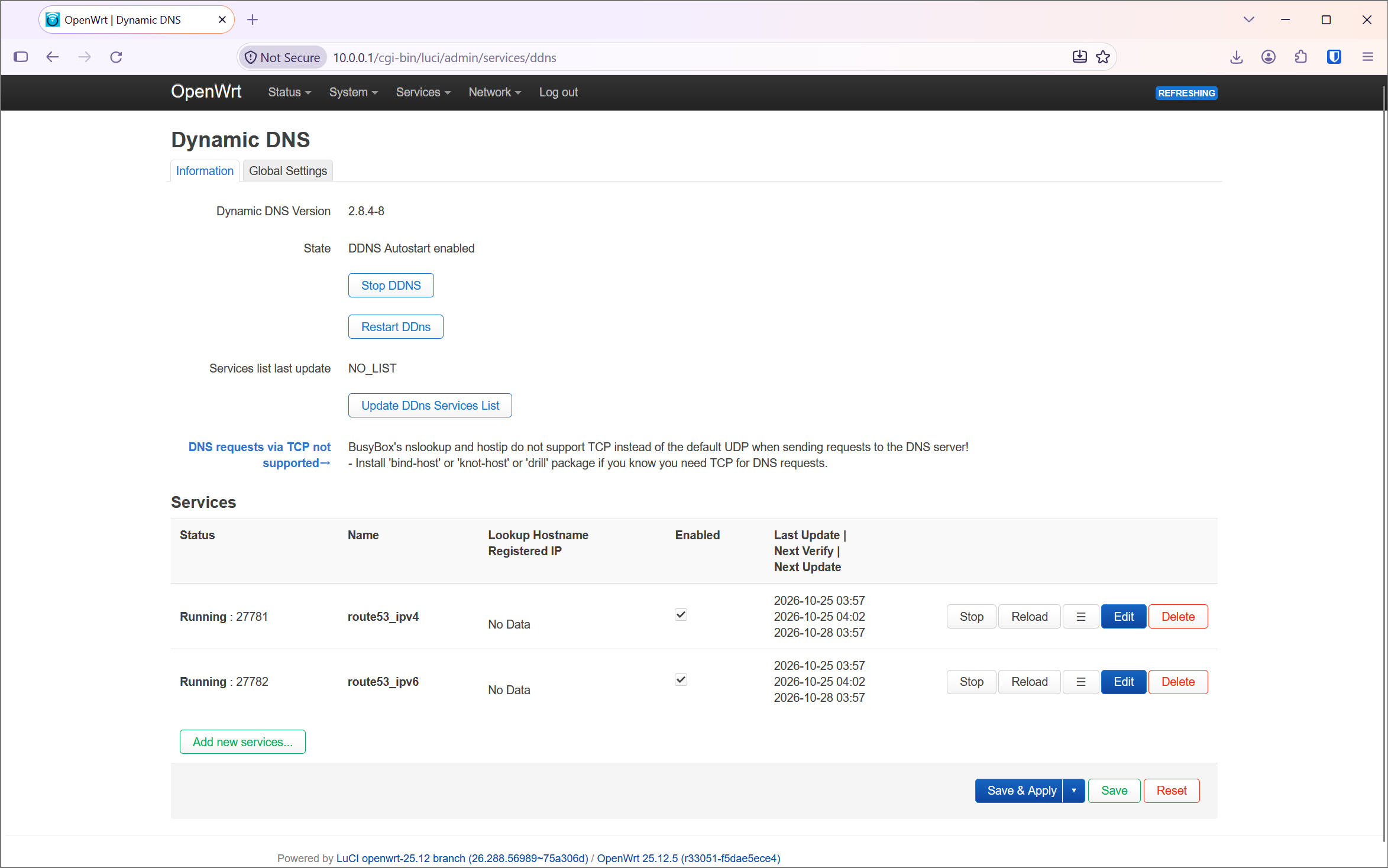
Both sections are running, the last update was sent at 03:57, the next verification follows after the check interval of 5 minutes, and the next forced update after 72 hours. “No Data” under the registered IP is normal at this point. The updater only fills it in after the verification, because its lookup at the start found no record yet.
Simulating a new address #
The first update only shows that the router can create the records. What I really wanted to know is whether it
notices when DNS and the WAN address no longer match, which is the whole point of dynamic DNS. My provider does not
hand out a new address on request, so I simulated it from the other side: I set both records in Route 53 to wrong
addresses and waited for the router to correct them. For this I used my own AWS user, not the one of the router,
and two addresses from the ranges reserved for documentation, so that no real host gets any traffic meanwhile.
I saved the change as wrong-records.json:
{
  "Comment": "DDNS test: wrong addresses",
  "Changes": [
    {
      "Action": "UPSERT",
      "ResourceRecordSet": {
        "Name": "home.example.com",
        "Type": "A",
        "TTL": 300,
        "ResourceRecords": [{ "Value": "192.0.2.1" }]
      }
    },
    {
      "Action": "UPSERT",
      "ResourceRecordSet": {
        "Name": "home.example.com",
        "Type": "AAAA",
        "TTL": 300,
        "ResourceRecords": [{ "Value": "2001:db8::1" }]
      }
    }
  ]
}
PS C:\> aws route53 change-resource-record-sets `
  --hosted-zone-id Z0123456789EXAMPLE `
  --change-batch file://wrong-records.json
{
  "ChangeInfo": {
    "Id": "/change/C0246813579EXAMPLE",
    "Status": "PENDING",
    "SubmittedAt": "2026-10-25T04:13:18.324000+00:00",
    "Comment": "DDNS test: wrong addresses"
  }
}
Both sections noticed the wrong addresses at their next check. The IPv6 section did so 36 seconds after the change, the IPv4 section about a minute and a half later:
root@OpenWrt:~# tail -n 14 /var/log/ddns/route53_ipv4.log
 041453       : Detect registered/public IP
 041453       : #> /usr/bin/nslookup home.example.com 1.1.1.1 >/var/run/ddns/route53_ipv4.dat 2>/var/run/ddns/route53_ipv4.err
 041453       : Registered IP '192.0.2.1' detected
 041453  WARN : Updating IP at DDNS provider failed - starting retry 1/0
 041453       : Detecting current IP using source: network
 041453       : Current IP '192.0.2.45' detected on network 'wan'
 041453       : Detected IP: 192.0.2.45
 041453       : Update needed - L: '192.0.2.45' <> R: '192.0.2.1'
 041453       : parsing script '/usr/lib/ddns/update_route53_v1.sh'
 041454       : <?xml version="1.0"?>
<ChangeResourceRecordSetsResponse xmlns="https://route53.amazonaws.com/doc/2013-04-01/"><ChangeInfo><Id>/change/C1357924680EXAMPLE</Id><Status>PENDING</Status><SubmittedAt>2026-10-25T04:14:54.464Z</SubmittedAt></ChangeInfo></ChangeResourceRecordSetsResponse>
 041454  info : Update successful - IP '192.0.2.45' send
 041454  info : Forced update successful - IP: '192.0.2.45' send
 041454       : Waiting 300 seconds (Check Interval); Next check at 2026-10-25 04:19
Please note the warning Updating IP at DDNS provider failed. Nothing failed here. The updater checks after every
interval whether its last update is still in DNS. If not, it treats this as a failed update and sends it again,
which is exactly what is needed here.
I was lucky with the timing, apparently 1.1.1.1 had no copy of the old records cached anymore. In the worst case, the cache holds the old address for the 300 seconds of the TTL, and a change is noticed only one check interval later, so after about 10 minutes. Keep in mind that this test does not cover the other way an update is triggered, a real change of the WAN address, which ddns-scripts picks up through hotplug.
Troubleshooting #
AccessDenied from Route 53 #
On my first start, both sections detected the WAN addresses correctly, but every update was rejected. The log showed this:
root@OpenWrt:~# tail /var/log/ddns/route53_ipv4.log
...
 034748       : Detected IP: 192.0.2.45
 034748       : Update needed - L: '192.0.2.45' <> R: ''
 034748       : parsing script '/usr/lib/ddns/update_route53_v1.sh'
 034749       : <?xml version="1.0"?>
<ErrorResponse xmlns="https://route53.amazonaws.com/doc/2013-04-01/"><Error><Type>Sender</Type><Code>AccessDenied</Code><Message>User: arn:aws:iam::123456789012:user/openwrt-ddns is not authorized to perform: route53:ChangeResourceRecordSets on resource: arn:aws:route53:::hostedzone/Z0123456789EXAMPLE because no identity-based policy allows the route53:ChangeResourceRecordSets action</Message></Error><RequestId>0f1e2d3c-4b5a-6978-8796-a5b4c3d2e1f0</RequestId></ErrorResponse>
 034749 ERROR : IP update not accepted by DDNS Provider
 034749       : Waiting 300 seconds (Check Interval); Next check at 2026-10-25 03:52
This means the router and its access key are fine, since AWS knows the user openwrt-ddns. It is the policy that
does not allow this particular change. In my case, I had saved the policy with the sample values from this article,
so it allowed home.example.com in the zone Z0123456789EXAMPLE, while the router tried to write my own domain in
my own zone. The message is the same when only one of the conditions does not match, so I compare the stored policy
with the router’s configuration:
PS C:\> aws iam get-user-policy --user-name openwrt-ddns `
  --policy-name route53-ddns --query PolicyDocument
root@OpenWrt:~# uci show ddns | grep -E 'lookup_host|domain'
The zone ID in Resource must be the same as domain, and the name in
ChangeResourceRecordSetsNormalizedRecordNames must be exactly lookup_host, in lowercase and without the trailing
dot. After fixing route53-ddns.json, the same aws iam put-user-policy command from
step 5 replaces the policy. Afterwards, the updater has to be
restarted, see the next section.
The updater does not recover after a failed first update #
After fixing the policy, I expected the next check to send the update. Instead, the log only showed failed lookups, one per minute, without end:
root@OpenWrt:~# tail -n 3 /var/log/ddns/route53_ipv4.log
 035650       : #> /usr/bin/nslookup home.example.com 1.1.1.1 >/var/run/ddns/route53_ipv4.dat 2>/var/run/ddns/route53_ipv4.err
 035650  WARN : NO valid IP found
 035650  WARN : Get registered/public IP for 'home.example.com' failed - retry 5/0 in 60 seconds
The reason is in dynamic_dns_updater.sh. After an update, the updater waits for the check interval and then looks
up lookup_host to verify that the update has arrived. As long as this lookup fails, it repeats it every 60 seconds
(retry_interval) and does not get back to sending an update. With retry_max_count at its default of 0, there
is no limit. So if the very first update fails and the record does not exist yet, the updater waits for a record
that will never be created. Once the record exists, this cannot happen anymore, because the lookup then returns
the old address and the updater simply sends a new update.
A restart of the service is enough to start over:
root@OpenWrt:~# service ddns restart
The Restart DDns button on the Dynamic DNS page in LuCI does the same. Right after the restart, the update went through:
root@OpenWrt:~# tail -n 6 /var/log/ddns/route53_ipv4.log
 035751       : Update needed - L: '192.0.2.45' <> R: ''
 035751       : parsing script '/usr/lib/ddns/update_route53_v1.sh'
 035752       : <?xml version="1.0"?>
<ChangeResourceRecordSetsResponse xmlns="https://route53.amazonaws.com/doc/2013-04-01/"><ChangeInfo><Id>/change/C0123456789EXAMPLE</Id><Status>PENDING</Status><SubmittedAt>2026-10-25T03:57:52.375Z</SubmittedAt></ChangeInfo></ChangeResourceRecordSetsResponse>
 035752  info : Update successful - IP '192.0.2.45' send
 035752  info : Forced update successful - IP: '192.0.2.45' send
Running the updater by hand #
ddns-scripts can run a single section in the foreground, with -v 2 for verbose output and -d for a dry run
that does not contact Route 53:
root@OpenWrt:~# /usr/lib/ddns/dynamic_dns_updater.sh \
  -S route53_ipv4 -v 2 -d start
I tried this while the service was already running, and it is of little use in that situation. Both runs only
compared the addresses. Since the record was already up to date, neither sent an update, and the run without -d
kept the terminal busy for the 5 minutes of the check interval before it verified once and exited. Keep in mind
two more things:
- The output starts with the whole uci section, including
usernameandpasswordin plain text. Do not paste it anywhere without removing them. - The script is supposed to stop the running process of the same section, and logs
'SIGTERM' was send to old process. In version 2.8.4-8, the line before it readsstop_section_processes: not found, and the service’s process kept running next to the manual one. The PID file in/var/run/ddns/then belongs to the manual run.
/usr/lib/ddns/dynamic_dns_updater.sh: line 267: stop_section_processes: not found
 040356       : 'SIGTERM' was send to old process
The service itself keeps working, since its process is managed by procd. But once the manual run has ended, the
PID file still points to it, and LuCI, which reads its status from that file, shows the section as not running. A
service ddns restart sets this straight. All in all, the log of the service gives the same information without
these side effects.
Alternatives #
There are two other ways I considered but did not choose:
- A container such as ddns-route53 on the Docker installation (article coming soon). It works, but a whole container for a job a 100-line shell script can do is too much in my opinion.
- An AWS Lambda function behind a function URL, called by ddns-scripts with a custom update URL. This keeps the AWS keys off the router, but it means writing and maintaining code in AWS.
Security considerations #
- The secret access key is stored in plain text in
/etc/config/ddns. The file is only readable by root (mode0600), but it is part of every configuration backup. Anyone who gets hold of a backup can change the record, but because of the policy, nothing else in the AWS account. - I plan to rotate the key from time to time: create a second access key, put it into the configuration, then
delete the old one with
aws iam delete-access-key. - The record makes the public addresses of my home connection visible to everyone who knows the name. That was already true for every server I contacted, but it is a reason to keep the name boring.
Files to keep across upgrades #
Nothing extra. The configuration lives in /etc/config/ddns, which is part of the backup anyway, and the package
is rebuilt into every new image by owut.
Summary and next steps #
With one small package and a narrowly scoped IAM user, the router keeps an A and an AAAA record in Route 53 up to date without any additional service. The name will be the endpoint of the WireGuard server, which is the topic of the next part.